
Aadhaar Complaint & Grievance Guide
If you're dealing with an Aadhaar problem, whether it's a wrong name, failed fingerprint, this guide walks you through exactly how to file a complaint and what to expect.
What Can You Complain About?
Before filing a complaint, here's what UIDAI actually lets you raise a grievance about:
- Wrong details on your card (name, DOB, address, gender, photo)
- Biometric failures (fingerprint or iris not matching during verification)
- Aadhaar not generated after enrolment
- Card not received by post
- Update request rejected without clear reason
- Suspected misuse of your Aadhaar number
- Problems at enrolment centres (rude staff, overcharging, refusal of service)
- Linking issues with PAN, bank, or SIM
| Method | Contact | When to Use |
|---|---|---|
| Phone | 1947 (toll-free) | Quick questions, status checks |
| Online Portal | uidai.gov.in > Grievance and Feedback | Formal complaints with tracking |
| help@uidai.gov.in | Complex issues with attachments | |
| Chatbot | "Ask Aadhaar" on uidai.gov.in | FAQs, finding nearest centre |
| Walk-In | Aadhaar Seva Kendra (your district) | Biometric updates, face-to-face help |
| Post | UIDAI HQ or Regional Office | No phone/internet access |
| Social Media | @UIDAI on Twitter/X | Public pressure, ignored complaints |
| CPGRAMS | pgportal.gov.in | Escalation when UIDAI doesn't respond |
What UIDAI Will Not Help With
UIDAI only handles issues with the Aadhaar system itself, not how other organisations use it. If the problem is on someone else's end, you'll need to complain to them directly:
- Bank refusing your Aadhaar for KYC or account opening: Complain to the bank's grievance cell first, then escalate to RBI (cms.rbi.org.in)
- Telecom company causing issues with SIM linking or verification: Contact the telecom provider, then escalate to TRAI
- Private business demanding your Aadhaar number: They're not allowed to under the Supreme Court's 2018 ruling (Section 57 was struck down). You can refuse, and if they insist, report it to the data protection authority or file a consumer complaint
- Employer or landlord insisting on Aadhaar: Aadhaar is not mandatory for private transactions. You're within your rights to offer an alternative ID
- Aadhaar-linked payment failed at your bank: That's a banking issue, not an Aadhaar issue. Contact your bank or file on the RBI complaint portal
Documents You Should Keep Ready
Before you start filing anything, gather these. Half the frustration people face is getting stuck mid-process because they don't have the right info:
- Enrolment ID (EID): The 14-digit number on your enrolment acknowledgement slip. You need this if your Aadhaar hasn't been generated yet.
- Update Request Number (URN): If you've submitted an update and it's stuck or rejected.
- Service Request Number (SRN): If you've already filed a complaint and want to follow up.
- Registered mobile number: The one linked to your Aadhaar. Most channels will ask for it.
- A valid ID proof: Any government-issued document (voter ID, passport, driving licence) in case you need to verify your identity at an ASK.
- Screenshots or documents related to the issue: Error messages, rejection emails, photos of the incorrect card, anything that shows what went wrong.
Method 1: Call the Toll-Free Number (1947)
This is the fastest way to get started.
How it works:
- Dial 1947 from any phone (it's free).
- Choose your language. The system supports 12 languages including Hindi, English, Tamil, Telugu, Bengali, Marathi, and others.
- For quick self-service (checking status, retrieving your Aadhaar number, etc.), follow the IVRS prompts. This works 24/7.
- To speak with a real person, wait for the option to connect with a support executive.
Live agent timings:
- Monday to Saturday: 7:00 AM to 11:00 PM
- Sunday: 8:00 AM to 5:00 PM
Method 2: File Online Through the UIDAI Portal
This is the most reliable method for formal complaints because you get a tracking number.
- Go to myaadhaar.uidai.gov.in
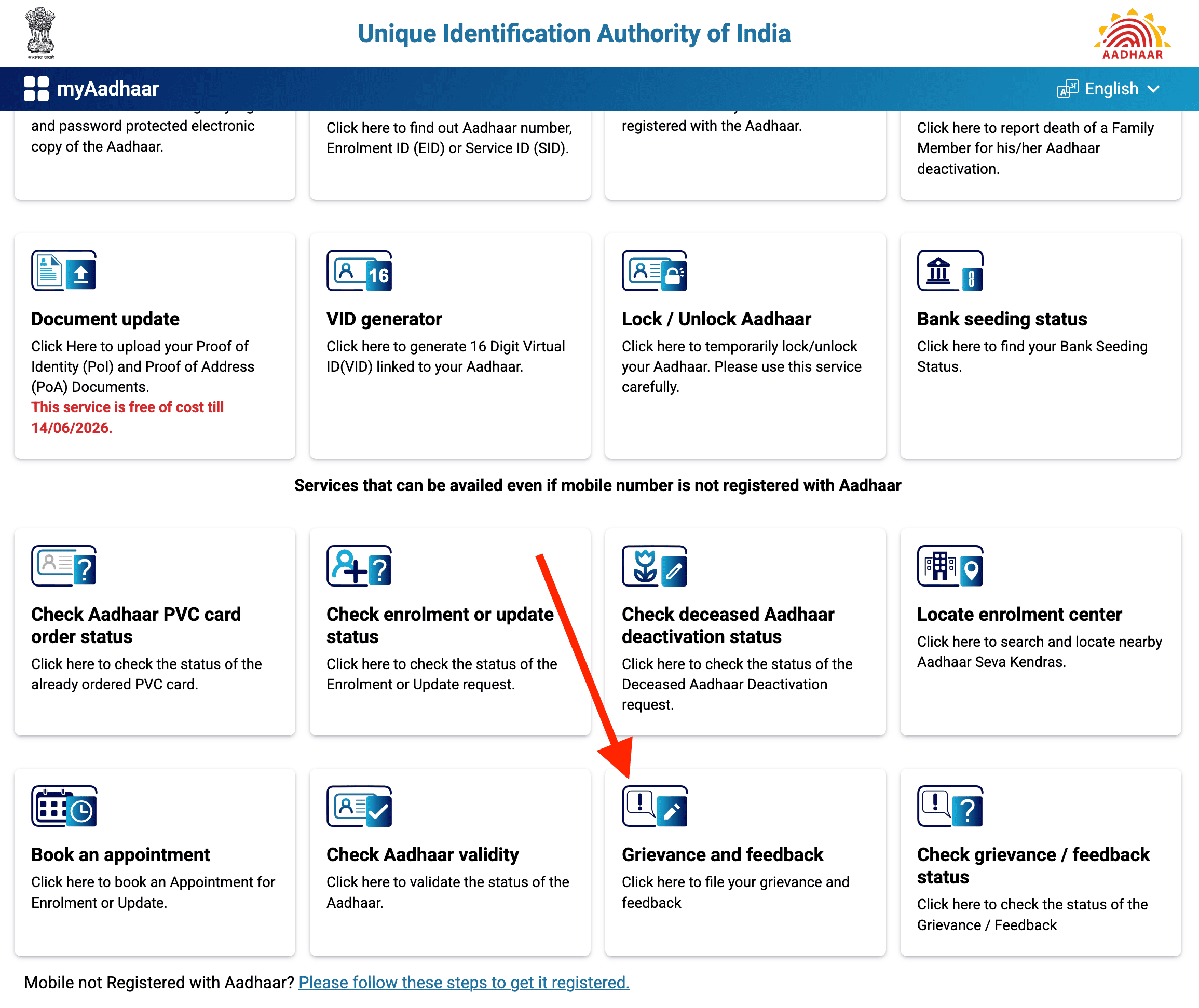
- Click on "Grievance and Feedback" from the cards shown on the page.
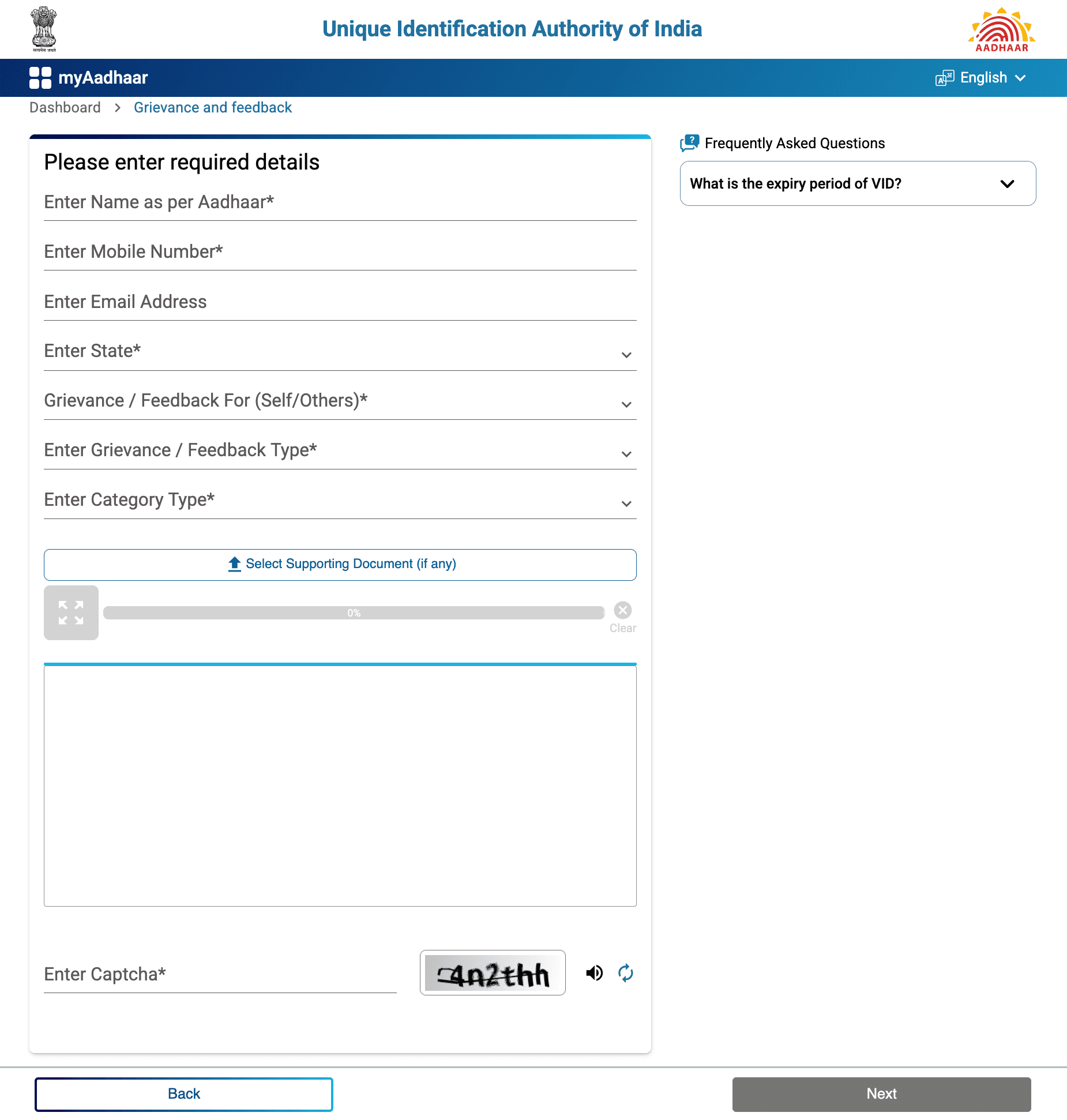
- Fill in your details: name, mobile number, email, and state.
- Choose the complaint category (e.g., "Aadhaar not generated," "Operator & Enrolment Agencies," etc.)
- Enter your EID/URN/SRN if you have one.
- Write a clear description of your problem. Be specific. Mention dates, centre names, and what went wrong.
- Enter the captcha and hit Submit.
Method 3: Send an Email
Write to help@uidai.gov.in with:
- Last 4 digits of your Aadhaar number (don't share the full number over email)
- Your registered mobile number
- A clear description of the issue
- Any supporting documents as attachments (screenshots, rejection notices, etc.)
Method 4: Use the Aadhaar Mitra Chatbot
On the UIDAI website, you'll see a blue "Ask Aadhaar" button in the bottom-right corner. This opens the Aadhaar Mitra chatbot (It supports Hindi and English only).
It's useful for:
- Finding the nearest enrolment centre
- Checking your enrolment or update status
- Getting quick answers to common questions
Method 5: Visit an Aadhaar Seva Kendra (In Person)
If you're not comfortable with phones or websites, or if your problem needs a biometric update, just walk into an Aadhaar Seva Kendra.
What to know:
- Open 7 days a week, 9:30 AM to 5:30 PM
- Wheelchair accessible, with provisions for elderly and disabled visitors
- You can book an appointment online at bookappointment.uidai.gov.in (free, no Aadhaar-linked mobile needed)
- Each centre has an Operations Manager you can complain to directly
Method 6: Write a Letter (Post)
Yes, you can still send a physical letter. Mail it to:
UIDAI Headquarters
Government of India Bangla Sahib Rd, Behind Kali Mandir, Gole Market, New Delhi - 110001
Or send it to your nearest UIDAI Regional Office. The list of regional offices with addresses is available at uidai.gov.in/en/contact-support/regional-offices.html.
Method 7: Complain on Social Media
Tag @UIDAI on Twitter/X, or message them on Facebook, or Instagram. Public tweets sometimes get faster responses because they're visible.
Method 8: Escalate Through CPGRAMS (Government Grievance Portal)
If UIDAI hasn't resolved your complaint, or you're unhappy with their response, this is your escalation route. CPGRAMS stands for Centralised Public Grievance Redress and Monitoring System. It's the Government of India's portal for complaints against any ministry or department.
How to use it:
- Go to pgportal.gov.in
- Click "Lodge Public Grievance".
- Select the ministry: Ministry of Electronics and Information Technology > UIDAI
- Fill in your grievance details and upload supporting documents.
- Submit. You'll get a unique registration ID.
Why this matters:
CPGRAMS has an appeal facility. If your complaint is closed and you're not satisfied, you can appeal. This adds a layer of accountability that UIDAI's own system doesn't have.
How to Track Your Complaint
Once you have your SRN (from the UIDAI portal) or registration ID (from CPGRAMS), tracking is simple:
On the UIDAI website:
- Go to uidai.gov.in
- Click "Contact & Support" > "Check Grievance / Feedback Status"
- Enter your SRN + captcha > Submit
By phone:
Call 1947 and follow the IVRS prompts for complaint status.
What the statuses mean:
- Pending = registered, not yet picked up
- In Progress = someone's working on it
- Resolved = UIDAI considers it done (you'll get an SMS/email)
- Rejected = declined (escalate through CPGRAMS if this feels wrong)
Common Mistakes
Filing without an EID/URN/SRN.
Without a reference number, UIDAI has nothing to look up. Your complaint sits in a generic queue and takes forever. Always include one if you have it.
Using third-party websites.
Searching "Aadhaar complaint" on Google will show you dozens of unofficial sites that look legit. They're not. Some will charge you money for free services. Others will harvest your personal data. Only use uidai.gov.in or myaadhaar.uidai.gov.in.
Writing vague complaints.
"My Aadhaar is not working" tells UIDAI nothing. Instead, write something like: "My name is spelled wrong on my Aadhaar card. I submitted an update request on 15 Jan 2025 (URN: XXXX) at ABC Enrolment Centre, Lucknow. It was rejected on 10 Feb with no reason given." The more specific, the faster it moves.
Not following up.
Filing a complaint and hoping for the best doesn't work. Check your status every couple of weeks. If it's stuck on "Pending" for more than a month, call 1947 or escalate to CPGRAMS.
Complaining to the wrong place.
If your bank won't accept your Aadhaar for KYC, that's a bank issue, not a UIDAI issue. File with the bank's grievance cell or RBI's complaint portal instead.
What to Do If Your Complaint Gets Rejected
Step 1: File again with better details.
Sometimes complaints get rejected because the description was unclear or the supporting documents were missing. Re-file on the UIDAI portal with more specific information and proper attachments.
Step 2: Escalate to CPGRAMS.
If re-filing doesn't work, go to pgportal.gov.in and lodge a fresh grievance. Mention your previous SRN and explain that it was rejected without adequate resolution. CPGRAMS routes this to a higher level within the ministry.
Step 3: Use the CPGRAMS appeal facility.
If even your CPGRAMS complaint gets closed unsatisfactorily, you can file an appeal on the same portal. This is a formal mechanism, not a suggestion box, and it triggers a review.
Step 4: File an RTI request.
If nothing is moving, file a Right to Information (RTI) application with UIDAI asking for the specific reason your complaint was rejected, what action was taken, and who handled it. You can file RTI online at rtionline.gov.in for a fee of ₹10. RTI has legal timelines (30 days for a response) and forces a documented answer. Many people don't know this route exists, but it's one of the most effective tools a citizen has.
Aadhaar Guides — Related Articles
Detailed guides covering Aadhaar card download, update, enrolment, PAN linking, and more.
Step 1: Open the MyAadhaar Portal · Step 2: Click on "Virtual ID (VID) Generator" · Step 3: Select "Generate VID" or "Retrieve VID" · Step 4: Enter Your Aadhaar Number and Captcha · Step 5: Request and Enter OTP · Step 6: Receive Your 16-Digit VID via SMS.
Aadhaar Complaint & GrievanceIf you're dealing with an Aadhaar problem, whether it's a wrong name, failed fingerprint, this guide walks you through exactly how to file a complaint and what to expect.
Aadhaar Card Download GuideLearn how to download your Aadhaar card online using the UIDAI portal, mAadhaar app, DigiLocker, and other official methods. Step by step, simple and quick.
Aadhaar Card Status GuideCheck your Aadhaar card status online for enrolment, update, and PVC card requests using myAadhaar portal, mAadhaar app, and UMANG app. You can also track your Aadhaar status by calling the UIDAI helpline at 1947.
Aadhaar Card Update GuideLearn how to update your Aadhaar card online and offline using the UIDAI portal, mAadhaar app, and nearest Aadhaar centre. Update your name, address, date of birth, mobile number, email, and photo easily.
My Aadhaar UIDAI Login GuideStep 1: Open the MyAadhaar Portal · Step 2: Enter Your Aadhaar Number · Step 3: Enter the Captcha · Step 4: Request OTP · Step 5: Enter OTP and Login.
Aadhaar Enrolment GuideLearn how to enrol for a new Aadhaar card in 2026. This guide covers required documents, appointment booking, and the step-by-step enrolment process for adults, children, NRIs, and foreign nationals.
Order Aadhaar PVC Card GuideLearn how to order your Aadhaar PVC card online through the myAadhaar portal and mAadhaar app. Check your PVC card order status, track delivery, fees, required documents, etc.
Retrieve Aadhaar Number GuideLearn how to retrieve your lost or forgotten Aadhaar number online and offline using the myAadhaar portal, mAadhaar app, the new Aadhaar app, the UIDAI helpline 1947, or by visiting an Aadhaar Enrolment Centre.
Aadhaar PAN Link GuideLearn how to link your PAN with Aadhaar online, via SMS, and offline using the Income Tax portal. Step-by-step guide covering link status check, late fee payment, name mismatch fix, PAN reactivation, and exemptions.
mAadhaar AppLearn everything about the mAadhaar app. Download, setup, all features explained (VID, TOTP, biometric lock, eKYC, and more), and how it differs from the new Aadhaar app launched in 2026.
New Aadhaar App 2026Learn everything about the new Aadhaar app launched by UIDAI in 2026. Selective sharing, face authentication, offline verification, and mobile number update. Complete setup guide.
Protect Your AadhaarLearn how to protect your Aadhaar from misuse using biometric lock, Virtual ID, masked Aadhaar, Aadhaar Authentication History, and more. Step by step, simple and practical.
Aadhaar Authentication FailedLearn how to fix Aadhaar authentication failures caused by locked biometrics, worn fingerprints, server issues, and data mismatches. Step by step, simple and practical.
Aadhaar Enabled Payment SystemLearn how AePS (Aadhaar Enabled Payment System) lets you withdraw cash, check your balance, and receive government benefits using just your Aadhaar number and fingerprint.