
Aadhaar PAN Link Guide
Learn how to link your PAN with Aadhaar online, via SMS, and offline using the Income Tax portal. Step-by-step guide covering link status check, late fee payment, name mismatch fix, PAN reactivation, and exemptions.
Why is PAN-Aadhaar Linking Mandatory?
The government made PAN-Aadhaar linking mandatory under Section 139AA of the Income Tax Act. The main reason is to eliminate duplicate PAN cards. Before Aadhaar, it was relatively easy for people to hold multiple PAN cards, which made it harder to track financial transactions and tax compliance.
By linking every PAN to a unique Aadhaar number, the Income Tax Department can tie each taxpayer to a single, verified identity. This helps reduce tax evasion, prevent fraud, and simplify the overall tax system.
| Sr. No. | PAN-Aadhaar Link Methods |
|---|---|
| 1 | Link PAN with Aadhaar Online |
| 2 | Link PAN with Aadhaar via SMS |
| 3 | Link PAN with Aadhaar Offline |
| 4 | Link PAN with Aadhaar (Name Mismatch) |
| 5 | Check PAN-Aadhaar Link Status |
| 5 | Reactivate an Inoperative PAN |
What Happens If Your PAN is Not Linked?
If your PAN is currently unlinked, it's already marked as inoperative since 1 January 2026. Here's what that means in real terms:
- You cannot file your income tax returns (ITR) using an inoperative PAN
- Any pending tax refunds will not be processed until the PAN is reactivated
- TDS and TCS will be deducted at higher rates (under Sections 206AA and 206CC)
- You cannot open new bank accounts or complete fresh KYC
- Investments in mutual funds, stocks, bonds, and insurance may be blocked for new transactions
- Loan applications (personal, home, or otherwise) may be rejected since PAN is a mandatory document for credit verification
- Forms like 15G and 15H (used to avoid TDS on fixed deposits) will not be accepted
How to Check If Your PAN is Already Linked
Before doing anything, check your current status. It's possible your PAN is already linked, especially if you got your PAN card recently using Aadhaar.
- Go to the Income Tax e-Filing portal at incometax.gov.in
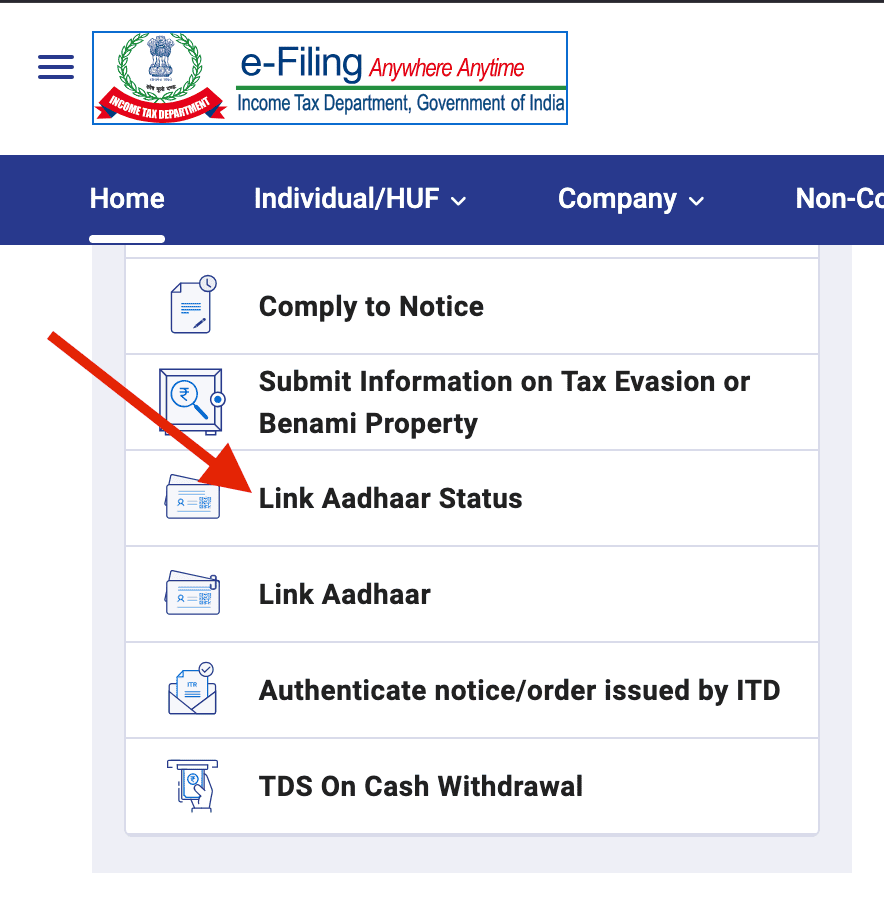
- Under "Quick Links" on the homepage, click "Link Aadhaar Status"
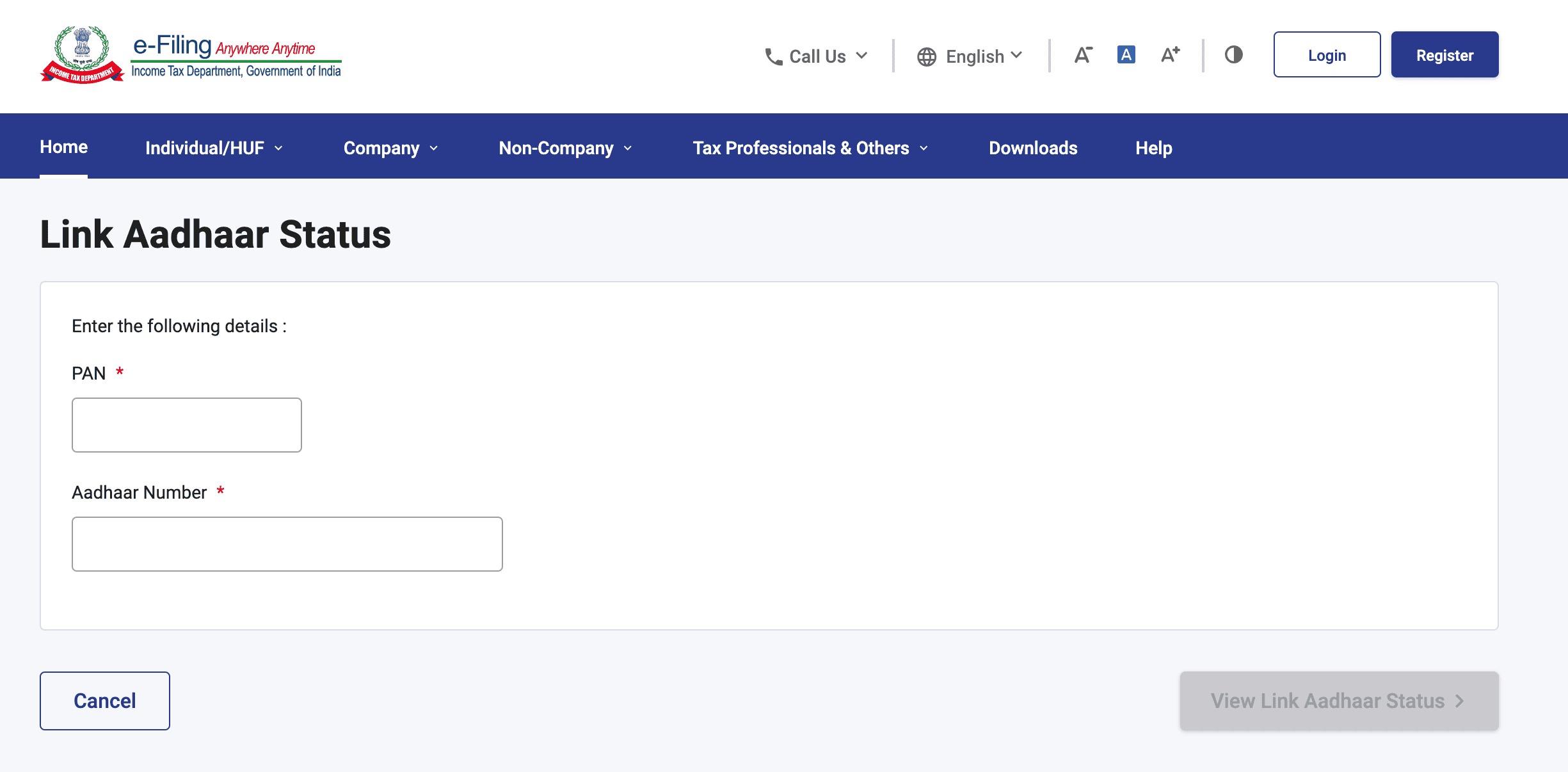
- Enter your 10-digit PAN number and 12-digit Aadhaar number
- Click "View Link Aadhaar Status"
The portal will show one of these messages:
- "Your PAN is already linked to Aadhaar" means you're all set. No action needed.
- "PAN not linked with Aadhaar" means you need to complete the linking process.
- "Your PAN is inoperative" means the deadline has passed and you'll need to pay the ₹1,000 fee before linking.
How to Link PAN with Aadhaar Online (Step by Step)
This is the most common method and works whether you're linking for the first time or reactivating an inoperative PAN.
Step 1: Visit the Income Tax Portal
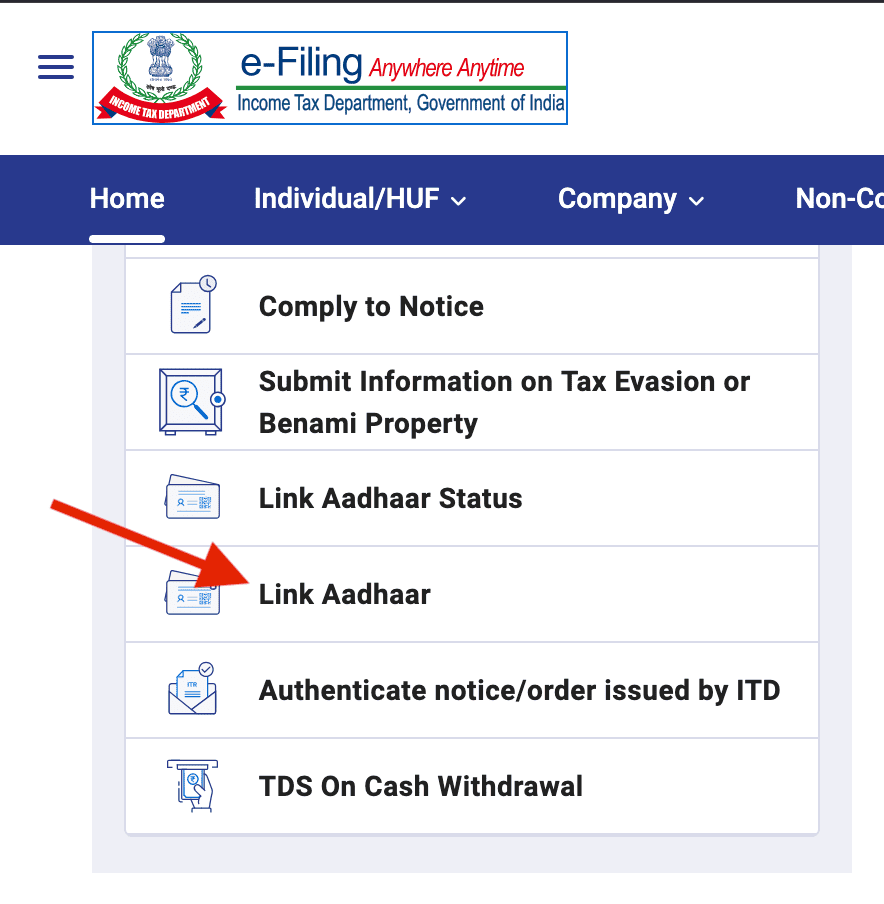
Go to incometax.gov.in and click "Link Aadhaar" under the Quick Links section on the homepage. You don't need to log in for this.
Step 2: Enter Your PAN and Aadhaar
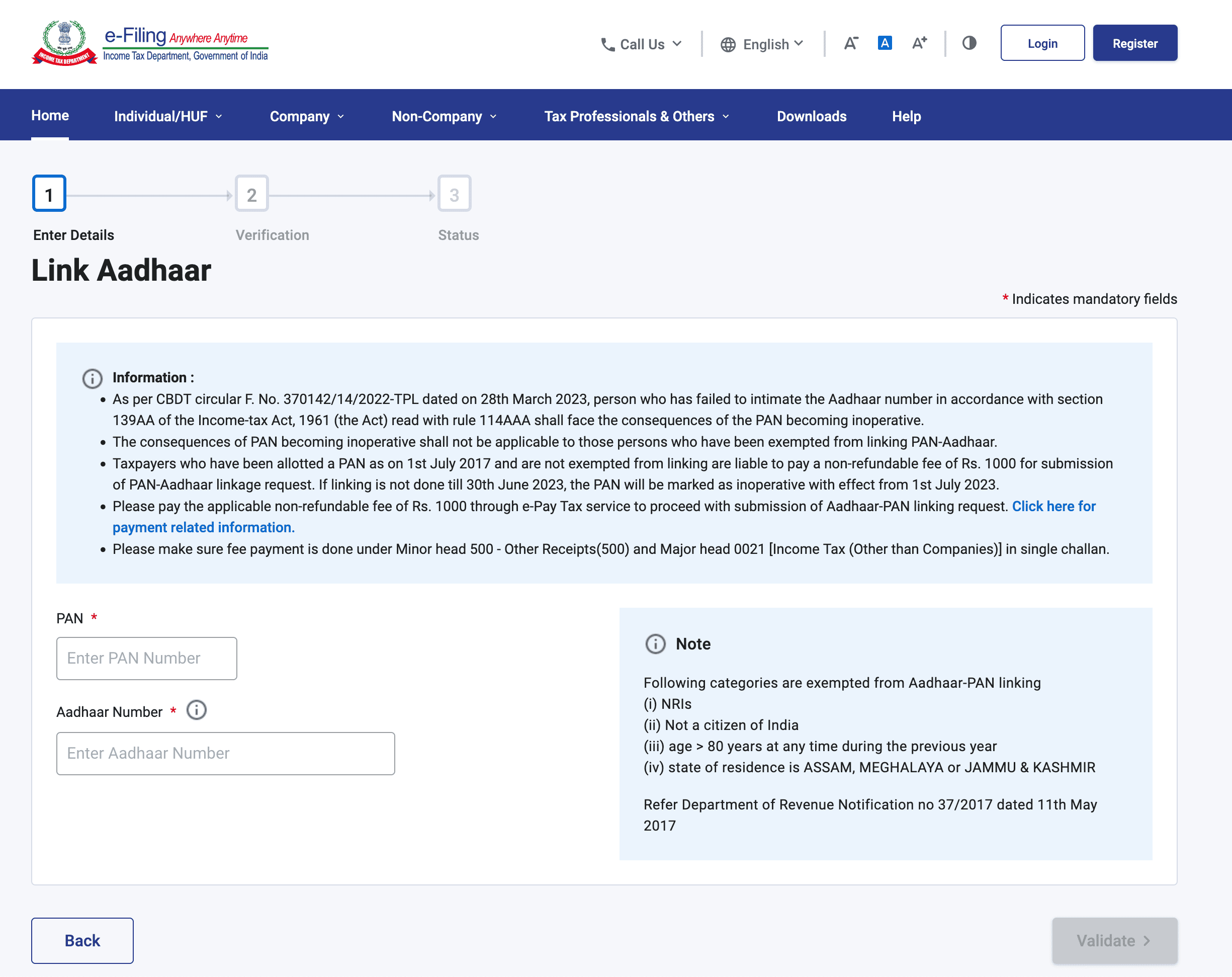
Type in your 10-digit PAN number and 12-digit Aadhaar number. Click "Validate".
Step 3: Pay the Late Fee (if applicable)
If you're linking after the deadline, the portal will show a message saying "Payment details not found for this PAN." Click "Continue to Pay Through e-Pay Tax" and follow these steps:
- Enter your PAN and mobile number, then verify with OTP
- On the e-Pay Tax page, click "Proceed" under the Income Tax tab
- Select Assessment Year as the current year
- Under Type of Payment, choose "Other Receipts (500)"
- Select "Fee for delay in linking PAN with Aadhaar"
- The system will show ₹1,000 as the amount
- Pay using UPI, debit card, credit card, or net banking
- Download the challan/receipt for your records
Step 4: Complete the Linking
Go back to the "Link Aadhaar" page. Re-enter your PAN and Aadhaar number. This time, after validation, enter your name exactly as it appears on your Aadhaar card.
An OTP will be sent to your Aadhaar-registered mobile number. Enter it and click "Link Aadhaar".
Step 5: Confirmation
You'll see a confirmation message that your request has been submitted to UIDAI for validation. The linking usually reflects within 3 to 7 working days, though in some cases it can take up to 30 days for your PAN to become operative again.
How to Link PAN with Aadhaar via SMS
If you prefer a simpler method without logging into any portal, you can use SMS. Type the following message:
Send it to 567678 or 56161.
For example: UIDPAN 123456789012 ABCDE1234F
How to Link PAN with Aadhaar Offline
If you don't have reliable internet access or prefer doing things in person, you can visit an authorised PAN Service Centre run by NSDL (Protean) or UTIITSL.
- Locate a nearby PAN service centre
- Carry your original PAN card and original Aadhaar card, along with self-attested photocopies of both
- The staff will help you fill out the required form and process the linking
- Biometric authentication may be done on the spot for verification
- A small service fee may apply at the centre
How to Link PAN with Aadhaar If There's a Name Mismatch
One of the most common reasons linking fails is a mismatch between the details on your PAN and Aadhaar. Even a small difference in how your name is spelled (like initials expanded on one but not the other) can cause the system to reject the link.
Here's how to fix it:
If the mismatch is minor (like "S Kumar" on PAN vs "Suresh Kumar" on Aadhaar), the system may still allow linking through OTP verification. Try the online method first. The portal sends an OTP to your Aadhaar-registered mobile, and the link goes through despite the small difference.
If the mismatch is significant, you'll need to correct one of the two documents before linking:
- To correct PAN details: Visit the NSDL (Protean) website at onlineservices.nsdl.com or the UTIITSL portal to submit a PAN correction request
- To correct Aadhaar details: Visit myaadhaar.uidai.gov.in to update your name, DOB, or gender online, or visit an Aadhaar enrolment centre
Who is Exempt from PAN-Aadhaar Linking?
Not everyone is required to link. The following categories are exempt:
- Non-Resident Indians (NRIs) as defined under the Income Tax Act
- Individuals who are not citizens of India
- Super senior citizens aged 80 years or above
- Residents of Assam, Meghalaya, and Jammu & Kashmir
How Long Does the Process Take?
| Step | Timeline |
|---|---|
| Late fee payment reflecting in the system | 2 hours to 72 hours |
| Linking request processing by UIDAI | 3 to 7 working days |
| PAN becoming operative again after linking | Up to 30 days |
How to Reactivate an Inoperative PAN
If your PAN has already been marked inoperative, the reactivation process is the same as the linking process described above. There's no separate form or application. You just:
- Pay the ₹1,000 late fee through the e-Pay Tax facility
- Wait for the payment to reflect
- Complete the PAN-Aadhaar linking on the portal
- Wait for UIDAI verification (up to 30 days)
Once linked successfully, your PAN becomes operative again and you can resume all financial and tax activities as normal.
Important Notes
1. The ₹1,000 late fee is non-negotiable.
If you missed the deadline, there's no way to link without paying it first. The system won't let you proceed to the linking step until the payment is verified.
2. Use only the official Income Tax portal.
The legitimate website is incometax.gov.in. Avoid third-party websites that claim to offer linking services. They may charge you extra or compromise your data.
3. Your Aadhaar-registered mobile number must be active.
OTP verification is required during linking, and the OTP goes to the mobile number linked with your Aadhaar (not your PAN). If that number is no longer active, you'll need to update your mobile number with UIDAI first.
4. PAN cards issued using Aadhaar are usually already linked.
If you applied for a new PAN card using your Aadhaar number, the two are often pre-linked. But it's still worth checking the status to confirm.
5. Name, DOB, and gender must match exactly.
Even minor discrepancies can cause linking to fail. Before starting, compare the details on both documents and correct any mismatches.
6. An inoperative PAN is not a cancelled PAN.
Your PAN number still belongs to you. It's just frozen until you complete the linking. You don't need to apply for a new PAN.
7. Linking is mandatory regardless of your income level.
Even if your income is below the taxable limit, or you're a homemaker or student who doesn't file returns, if you hold both a PAN and an Aadhaar, you're required to link them. The only exceptions are the exempt categories listed above.
8. For help, contact the right helplines.
For PAN-related issues, call the Income Tax helpline or visit the NSDL/UTIITSL portals. For Aadhaar-related issues (like updating your mobile number or correcting details), call UIDAI at 1947 or visit uidai.gov.in.
Aadhaar Guides — Related Articles
Detailed guides covering Aadhaar card download, update, enrolment, PAN linking, and more.
Step 1: Open the MyAadhaar Portal · Step 2: Click on "Virtual ID (VID) Generator" · Step 3: Select "Generate VID" or "Retrieve VID" · Step 4: Enter Your Aadhaar Number and Captcha · Step 5: Request and Enter OTP · Step 6: Receive Your 16-Digit VID via SMS.
Aadhaar Complaint & GrievanceIf you're dealing with an Aadhaar problem, whether it's a wrong name, failed fingerprint, this guide walks you through exactly how to file a complaint and what to expect.
Aadhaar Card Download GuideLearn how to download your Aadhaar card online using the UIDAI portal, mAadhaar app, DigiLocker, and other official methods. Step by step, simple and quick.
Aadhaar Card Status GuideCheck your Aadhaar card status online for enrolment, update, and PVC card requests using myAadhaar portal, mAadhaar app, and UMANG app. You can also track your Aadhaar status by calling the UIDAI helpline at 1947.
Aadhaar Card Update GuideLearn how to update your Aadhaar card online and offline using the UIDAI portal, mAadhaar app, and nearest Aadhaar centre. Update your name, address, date of birth, mobile number, email, and photo easily.
My Aadhaar UIDAI Login GuideStep 1: Open the MyAadhaar Portal · Step 2: Enter Your Aadhaar Number · Step 3: Enter the Captcha · Step 4: Request OTP · Step 5: Enter OTP and Login.
Aadhaar Enrolment GuideLearn how to enrol for a new Aadhaar card in 2026. This guide covers required documents, appointment booking, and the step-by-step enrolment process for adults, children, NRIs, and foreign nationals.
Order Aadhaar PVC Card GuideLearn how to order your Aadhaar PVC card online through the myAadhaar portal and mAadhaar app. Check your PVC card order status, track delivery, fees, required documents, etc.
Retrieve Aadhaar Number GuideLearn how to retrieve your lost or forgotten Aadhaar number online and offline using the myAadhaar portal, mAadhaar app, the new Aadhaar app, the UIDAI helpline 1947, or by visiting an Aadhaar Enrolment Centre.
Aadhaar PAN Link GuideLearn how to link your PAN with Aadhaar online, via SMS, and offline using the Income Tax portal. Step-by-step guide covering link status check, late fee payment, name mismatch fix, PAN reactivation, and exemptions.
mAadhaar AppLearn everything about the mAadhaar app. Download, setup, all features explained (VID, TOTP, biometric lock, eKYC, and more), and how it differs from the new Aadhaar app launched in 2026.
New Aadhaar App 2026Learn everything about the new Aadhaar app launched by UIDAI in 2026. Selective sharing, face authentication, offline verification, and mobile number update. Complete setup guide.
Protect Your AadhaarLearn how to protect your Aadhaar from misuse using biometric lock, Virtual ID, masked Aadhaar, Aadhaar Authentication History, and more. Step by step, simple and practical.
Aadhaar Authentication FailedLearn how to fix Aadhaar authentication failures caused by locked biometrics, worn fingerprints, server issues, and data mismatches. Step by step, simple and practical.
Aadhaar Enabled Payment SystemLearn how AePS (Aadhaar Enabled Payment System) lets you withdraw cash, check your balance, and receive government benefits using just your Aadhaar number and fingerprint.