
My Aadhaar UIDAI Login Guide
Step 1: Open the MyAadhaar Portal · Step 2: Enter Your Aadhaar Number · Step 3: Enter the Captcha · Step 4: Request OTP · Step 5: Enter OTP and Login.
What is the MyAadhaar Portal?
The MyAadhaar portal is a login-based platform run by UIDAI (Unique Identification Authority of India) where Aadhaar holders can access all Aadhaar-related services online.
Before this portal existed, most Aadhaar services required visiting an enrolment centre in person. Now, a large chunk of those services are available online through myaadhaar.uidai.gov.in, as long as you have a registered mobile number linked to your Aadhaar.
The portal is different from the main UIDAI website (uidai.gov.in). The UIDAI website is more of an information hub. It has FAQs, circulars, and general details about the Aadhaar programme.
What is SSUP My Aadhaar UIDAI?
SSUP (Self Service Update Portal) is an online facility provided by the Unique Identification Authority of India under the My Aadhaar section. It allows Aadhaar holders to update or correct certain details in their Aadhaar records without visiting an enrollment center. Through SSUP, users can conveniently modify information such as address and other permitted demographic details by verifying their identity with an OTP sent to their registered mobile number.
What You Need Before Logging In
Before you try to log in, make sure you have these ready:
- Your 12-digit Aadhaar number (or 16-digit Virtual ID, if you prefer not to use your Aadhaar number directly)
- Access to your Aadhaar-registered mobile number
- A working internet connection and a modern browser (Chrome, Firefox, Edge, or Safari). The portal works on both desktop and mobile browsers.
How to Login to MyAadhaar UIDAI Portal in 2026 (Step-by-Step)
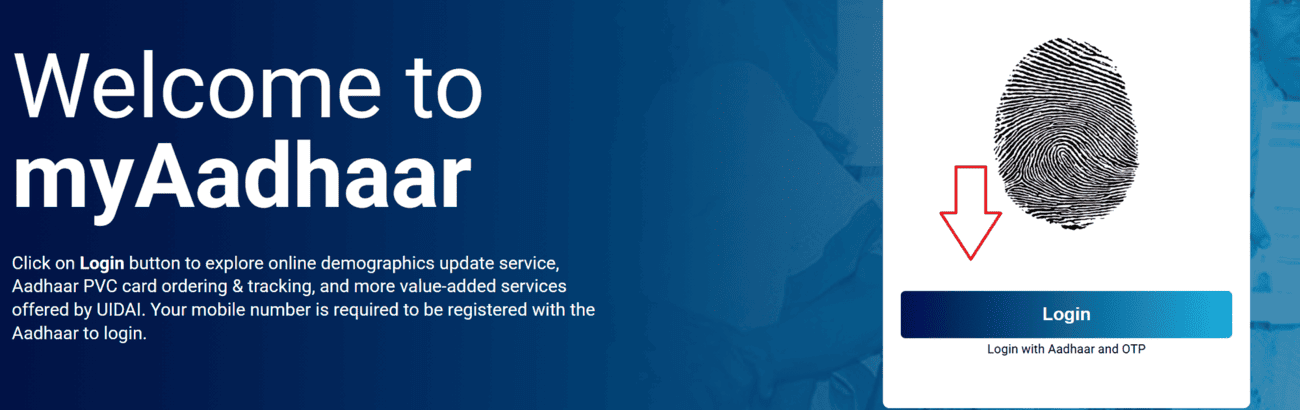
Step 1: Open the MyAadhaar Portal
Go to myaadhaar.uidai.gov.in in your browser.
On the homepage, you'll see a list of services like Download Aadhaar, Check Aadhaar Status, Order PVC Card, etc. For a full dashboard experience, click "Login" at the top of the page.
Step 2: Enter Your Aadhaar Number
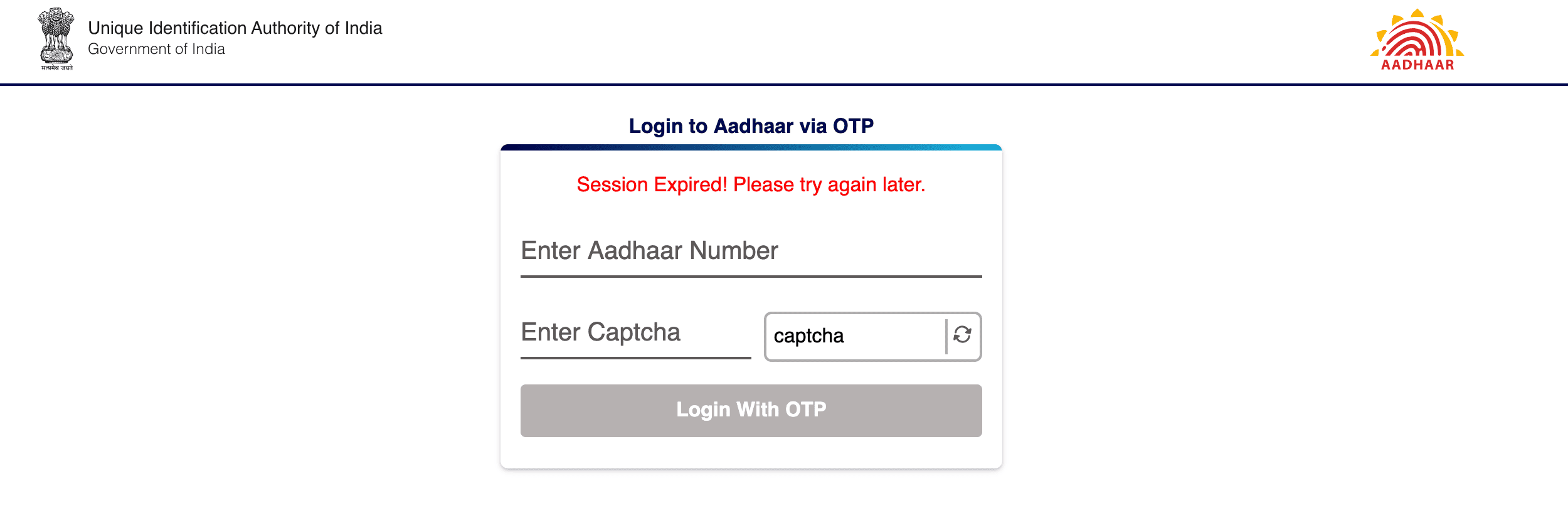
On the login page, type your 12-digit Aadhaar number. If you don't want to share your Aadhaar number directly, you can use your 16-digit Virtual ID (VID) instead. The VID works exactly the same way for authentication.
Step 3: Enter the Captcha
A security code (captcha) will be displayed on the screen. Type it exactly as shown. The captcha is case-sensitive. If it's hard to read, click the refresh icon next to it to generate a new one.
Step 4: Request OTP
Click "Send OTP". An OTP will be sent to the mobile number registered with your Aadhaar. This is not a number you enter on the portal. It's the number already linked in UIDAI's database. The OTP is valid for 10 minutes.
Step 5: Enter OTP and Login
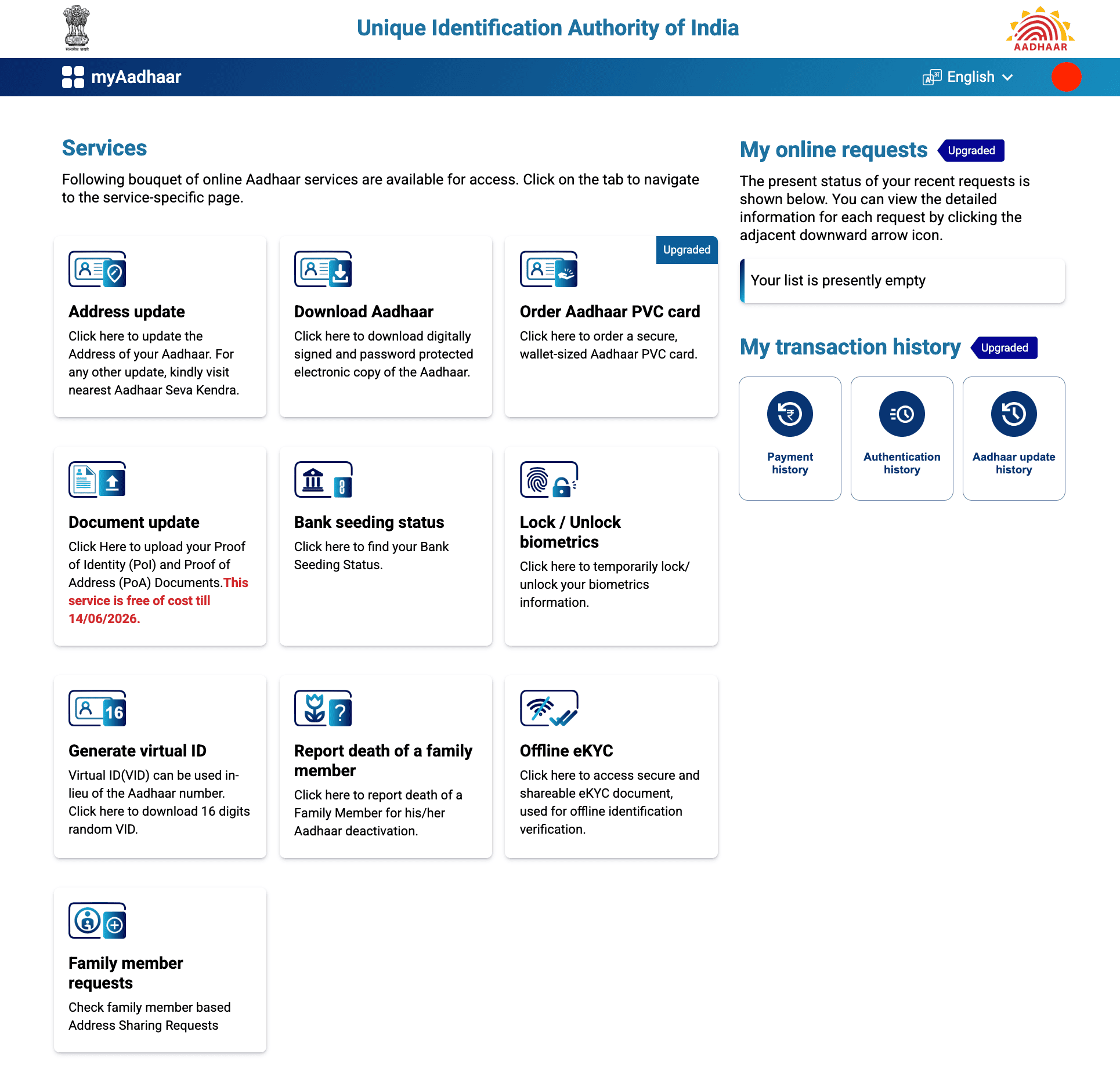
Enter the 6-digit OTP you received and click "Login". Once verified, you'll be taken to your Aadhaar dashboard where all services are available.
Services Available After Logging In
Once you're inside the dashboard, you get access to a wide range of services. Here's what's available:
| Service | What It Does |
|---|---|
| Address Update | Update the address on your Aadhaar online. For other updates (name, DOB, gender), visit the nearest Aadhaar Seva Kendra |
| Download Aadhaar | Download password-protected e-Aadhaar PDF. Password: first 4 letters of name in CAPS + birth year (e.g., SURE1990) |
| Order Aadhaar PVC Card | Get a secure, wallet-sized PVC card delivered via Speed Post |
| Document Update | Upload Proof of Identity (PoI) and Proof of Address (PoA) documents. Free of cost till 14/06/2026 |
| Generate Virtual ID (VID) | Create a temporary 16-digit random number for authentication instead of sharing your actual Aadhaar number |
| Lock/Unlock Biometrics | Temporarily lock or unlock your fingerprint and iris information to prevent misuse |
| Download Offline e-KYC | Access a secure and shareable eKYC document for offline identity verification |
| Bank Seeding Status | Check whether your Aadhaar is linked (seeded) to your bank account |
| Report Death of a Family Member | Report the death of a family member to deactivate their Aadhaar |
| Family Member Requests | Check family-member-based address sharing requests |
| My Transaction History | View payment history, authentication history, and Aadhaar update history in one place |
Services Available Without Login
Not every service requires logging in. Some can be accessed directly from the homepage.
| Service | Login Required? |
|---|---|
| Download Aadhaar | No (also available after login) |
| Retrieve Aadhaar Number/EID/SID | No |
| Verify Email/Mobile | No |
| Report Death of a Family Member | No (also available after login) |
| Document Update | No (also available after login) |
| VID Generator | No (also available after login) |
| Lock/Unlock Aadhaar | No |
| Bank Seeding Status | No (also available after login) |
| Check Aadhaar PVC Card Order Status | No (no registered mobile needed) |
| Check Enrolment or Update Status | No (no registered mobile needed) |
| Check Deceased Aadhaar Deactivation Status | No (no registered mobile needed) |
| Locate Enrolment Centre | No (no registered mobile needed) |
| Book an Appointment | No (no registered mobile needed) |
| Check Aadhaar Validity | No (no registered mobile needed) |
| Grievance and Feedback | No (no registered mobile needed) |
| Check Grievance/Feedback Status | No (no registered mobile needed) |
How to Login Using TOTP (Time-Based OTP) via mAadhaar App
If you're not receiving OTPs on time or you want a faster, more reliable method. UIDAI offers TOTP through the mAadhaar app. TOTP is a time-sensitive code generated on your phone that refreshes every 30 seconds, similar to how Google Authenticator works.
Step 1: Install the mAadhaar App
Download the official mAadhaar app from the Google Play Store (Android) or Apple App Store (iOS).
Step 2: Register Your Aadhaar Profile
Open the app and tap "Register Aadhaar". Create a 4-digit PIN (remember this - you'll need it every time you open the app). Enter your Aadhaar number, solve the captcha, and verify with OTP. Your profile will be registered.
Step 3: Generate TOTP
Inside the app, look for the "TOTP" option. Tap it, and a 6-digit code will appear. This code is valid for only 30 seconds before a new one is generated.
Step 4: Use TOTP on the Portal
Go to the MyAadhaar login page, enter your Aadhaar number and captcha as usual. When asked for OTP, enter the TOTP from the mAadhaar app instead. It works the same way.
How to Login via the mAadhaar App (Mobile Login)
If you do not want to use the myAadhaar web portal, you can try the mAadhaar app, which gives you access to most of the same services available on the portal.
After registering your profile in the app, tap "My Aadhaar" at the bottom of the screen and enter your 4-digit PIN. This opens your personal Aadhaar dashboard where you can download e-Aadhaar, view your profile, share QR codes, generate VID, and more.
The app also lets you store up to 5 Aadhaar profiles (for family members), and each profile requires separate OTP verification during setup. Once set up, the app acts as a valid digital ID and can be shown wherever Aadhaar is accepted.
Common Errors During Login and How to Fix Them
| Error/Problem | What It Means | Fix |
|---|---|---|
| "OTP sent to registered mobile" but no SMS received | OTP went to the old/wrong number, or SMS is delayed | Verify your registered number; try TOTP; wait and retry |
| Captcha not loading | Browser cache issue, session expired, or slow connection | Clear browser cache, try incognito mode, or switch browsers |
| "Technical error, please try again later" | Server overload or maintenance | Wait 30 minutes and retry; avoid peak hours |
| "Invalid Aadhaar Number" | Typo or Aadhaar has been deactivated | Double-check the number; verify at uidai.gov.in |
| OTP expired | You took more than 10 minutes to enter it | Request a fresh OTP and enter it within 10 minutes |
| "Maximum OTP attempts exceeded" | Too many requests in a short period | Wait 24 hours or use TOTP from mAadhaar app |
| Portal not opening on mobile | Compatibility issue with mobile browser | Try Chrome or switch to the mAadhaar app |
How to Update Your Mobile Number If It's Not Registered
If your mobile number isn't linked to your Aadhaar, you're essentially locked out of all online services. Here's how to fix it:
Visit an Aadhaar Enrolment Centre or Aadhaar Seva Kendra in person. Carry your Aadhaar card and the new mobile number you want to link. No documents are needed for a mobile number update. Your identity is verified through biometric authentication (fingerprint or iris scan) on the spot.
Once updated, wait at least 24 to 72 hours before trying to use OTP-based services, as the new number takes some time to fully propagate across UIDAI's systems.
Official Ways to Access Aadhaar Services
The MyAadhaar portal isn't the only place to manage your Aadhaar. There are a few other official platforms where you can access some or all of the same services. Depending on what you need, one of these might be more convenient.
| Platform | Best For | Aadhaar Services Available |
|---|---|---|
| myAadhaar Portal | Full access to all services via browser | Everything — download, update, lock/unlock, VID, PVC card, appointments, auth history |
| mAadhaar App | Digital ID on the go + TOTP | Download, VID, TOTP, biometric lock, QR sharing, family profiles |
| New Aadhaar App | Mobile number/email update without visiting centre | Face Auth updates, download, offline display, notifications |
| DigiLocker | Storing Aadhaar alongside all other government documents | Download and store e-Aadhaar, access issued documents |
| UMANG | One app for all government services | Download e-Aadhaar, verify Aadhaar, limited services |
Security Tips
1. Always use official portals and apps.
Bookmark myaadhaar.uidai.gov.in to avoid accidentally visiting a fake site. The only legitimate sources for Aadhaar services are uidai.gov.in, the Aadhaar app (by UIDAI), the mAadhaar app (by UIDAI), DigiLocker, and UMANG.
2. Never share your OTP with anyone.
UIDAI will never call you and ask for an OTP. If someone does, it's a scam.
3. Lock your biometrics when not in use.
This prevents anyone from misusing your fingerprint or iris data for unauthorized authentication.
4. Use Virtual ID (VID) instead of your Aadhaar number wherever possible.
The VID is temporary, revocable, and serves the same purpose for authentication without exposing your actual Aadhaar number.
5. Log out after every session.
Don't just close the browser tab — click the logout option to properly end your session.
6. Avoid using public computers or public Wi-Fi to access the portal.
If you must, use incognito mode and make sure you log out and clear the browser data afterward.
7. Check your Aadhaar Authentication History periodically
To see if your Aadhaar has been used without your knowledge.
8. Keep your mobile number updated and active.
Almost every Aadhaar service depends on OTP verification. If your linked number goes inactive or you switch to a new one without updating, you'll be locked out of online services.
Aadhaar Guides — Related Articles
Detailed guides covering Aadhaar card download, update, enrolment, PAN linking, and more.
Step 1: Open the MyAadhaar Portal · Step 2: Click on "Virtual ID (VID) Generator" · Step 3: Select "Generate VID" or "Retrieve VID" · Step 4: Enter Your Aadhaar Number and Captcha · Step 5: Request and Enter OTP · Step 6: Receive Your 16-Digit VID via SMS.
Aadhaar Complaint & GrievanceIf you're dealing with an Aadhaar problem, whether it's a wrong name, failed fingerprint, this guide walks you through exactly how to file a complaint and what to expect.
Aadhaar Card Download GuideLearn how to download your Aadhaar card online using the UIDAI portal, mAadhaar app, DigiLocker, and other official methods. Step by step, simple and quick.
Aadhaar Card Status GuideCheck your Aadhaar card status online for enrolment, update, and PVC card requests using myAadhaar portal, mAadhaar app, and UMANG app. You can also track your Aadhaar status by calling the UIDAI helpline at 1947.
Aadhaar Card Update GuideLearn how to update your Aadhaar card online and offline using the UIDAI portal, mAadhaar app, and nearest Aadhaar centre. Update your name, address, date of birth, mobile number, email, and photo easily.
My Aadhaar UIDAI Login GuideStep 1: Open the MyAadhaar Portal · Step 2: Enter Your Aadhaar Number · Step 3: Enter the Captcha · Step 4: Request OTP · Step 5: Enter OTP and Login.
Aadhaar Enrolment GuideLearn how to enrol for a new Aadhaar card in 2026. This guide covers required documents, appointment booking, and the step-by-step enrolment process for adults, children, NRIs, and foreign nationals.
Order Aadhaar PVC Card GuideLearn how to order your Aadhaar PVC card online through the myAadhaar portal and mAadhaar app. Check your PVC card order status, track delivery, fees, required documents, etc.
Retrieve Aadhaar Number GuideLearn how to retrieve your lost or forgotten Aadhaar number online and offline using the myAadhaar portal, mAadhaar app, the new Aadhaar app, the UIDAI helpline 1947, or by visiting an Aadhaar Enrolment Centre.
Aadhaar PAN Link GuideLearn how to link your PAN with Aadhaar online, via SMS, and offline using the Income Tax portal. Step-by-step guide covering link status check, late fee payment, name mismatch fix, PAN reactivation, and exemptions.
mAadhaar AppLearn everything about the mAadhaar app. Download, setup, all features explained (VID, TOTP, biometric lock, eKYC, and more), and how it differs from the new Aadhaar app launched in 2026.
New Aadhaar App 2026Learn everything about the new Aadhaar app launched by UIDAI in 2026. Selective sharing, face authentication, offline verification, and mobile number update. Complete setup guide.
Protect Your AadhaarLearn how to protect your Aadhaar from misuse using biometric lock, Virtual ID, masked Aadhaar, Aadhaar Authentication History, and more. Step by step, simple and practical.
Aadhaar Authentication FailedLearn how to fix Aadhaar authentication failures caused by locked biometrics, worn fingerprints, server issues, and data mismatches. Step by step, simple and practical.
Aadhaar Enabled Payment SystemLearn how AePS (Aadhaar Enabled Payment System) lets you withdraw cash, check your balance, and receive government benefits using just your Aadhaar number and fingerprint.