
Order Aadhaar PVC Card Guide
Learn how to order your Aadhaar PVC card online through the myAadhaar portal and mAadhaar app. Check your PVC card order status, track delivery, fees, required documents, etc.
What is PVC Aadhaar Card?
The PVC Aadhaar card is made from polyvinyl chloride (PVC), the same material used for debit cards and ATM cards. It contains all the same information as your regular Aadhaar: your name, Aadhaar number, photograph, date of birth, gender, address, and a QR code.
The key difference is durability and form factor. It's compact, waterproof, tear-resistant, and designed to be carried around daily without getting damaged.
In terms of validity, the PVC card holds exactly the same legal weight as your e-Aadhaar, your Aadhaar letter (the one that comes by post), or a regular printout. You can use it as identity proof anywhere Aadhaar is accepted.
Security Features
The PVC card comes with a few extra security features that a plain paper printout doesn't have:
- Secure QR code that encodes your demographic data for offline verification
- Hologram to prevent counterfeiting
- Micro-text that's difficult to replicate
- Ghost image (a faint secondary photo of your face)
- Guilloche patterns (fine, intricate design elements used in secure documents)
Do You Actually Need One?
Let's be honest about this. The PVC Aadhaar card is not mandatory. If your e-Aadhaar download or your existing Aadhaar letter is in good shape, you don't need to order one. UIDAI offers it purely as a convenience for people who want a more durable, professional-looking card.
That said, it's genuinely useful if:
- Your paper Aadhaar is damaged, faded, or torn
- You want something compact that fits in your wallet like a debit card
- You frequently need to show a physical ID (for example, at airports, hotels, or government offices)
- You want the added security features for verification purposes
- You're ordering for a family member who tends to lose or damage paper documents
Order Aadhaar PVC Card using myAadhaar
The entire process is done through the myAadhaar portal. Here's how it works step by step.
Step 1: Log In to the myAadhaar Portal
Go to myaadhaar.uidai.gov.in and log in using your 12-digit Aadhaar number. You'll need to verify with an OTP sent to your registered mobile number.
Step 2: Select "Order Aadhaar PVC Card"
Once logged in, find the "Order Aadhaar PVC Card" option on the services dashboard and click on it.
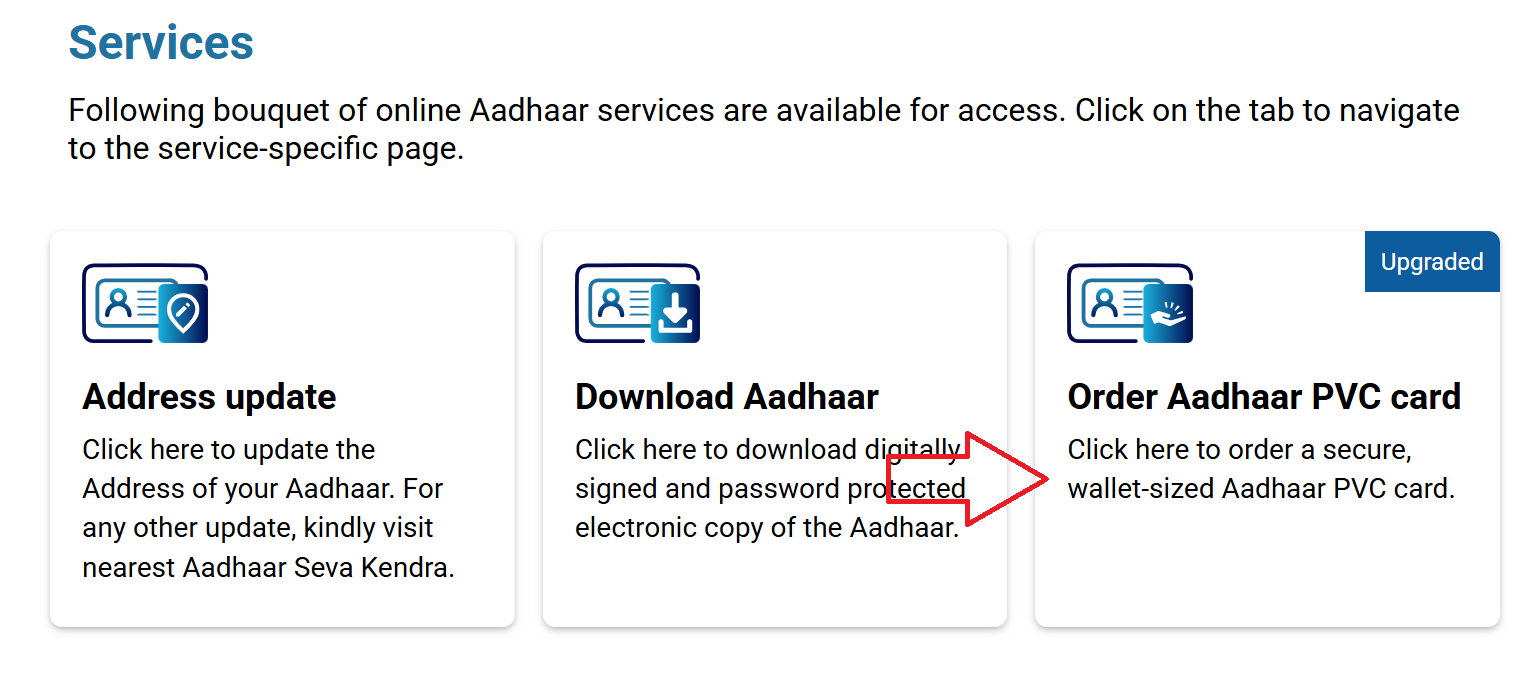
Step 3: Review Your Details
The portal will show a preview of your current Aadhaar details: your name, photo, date of birth, gender, and address. Look at these carefully because this is exactly what will be printed on the card.
If anything is outdated or wrong (especially your address or photo), do not place the order yet. Update your Aadhaar first, wait for the update to be approved, and then come back to order the PVC card. Ordering with outdated details means you'll get a card with wrong information and you'll need to pay again for a new one.
Step 4: Make the Payment
The PVC Aadhaar card costs ₹75 (inclusive of GST and Speed Post delivery charges). You can pay using:
- UPI
- Debit card
- Credit card
- Net banking
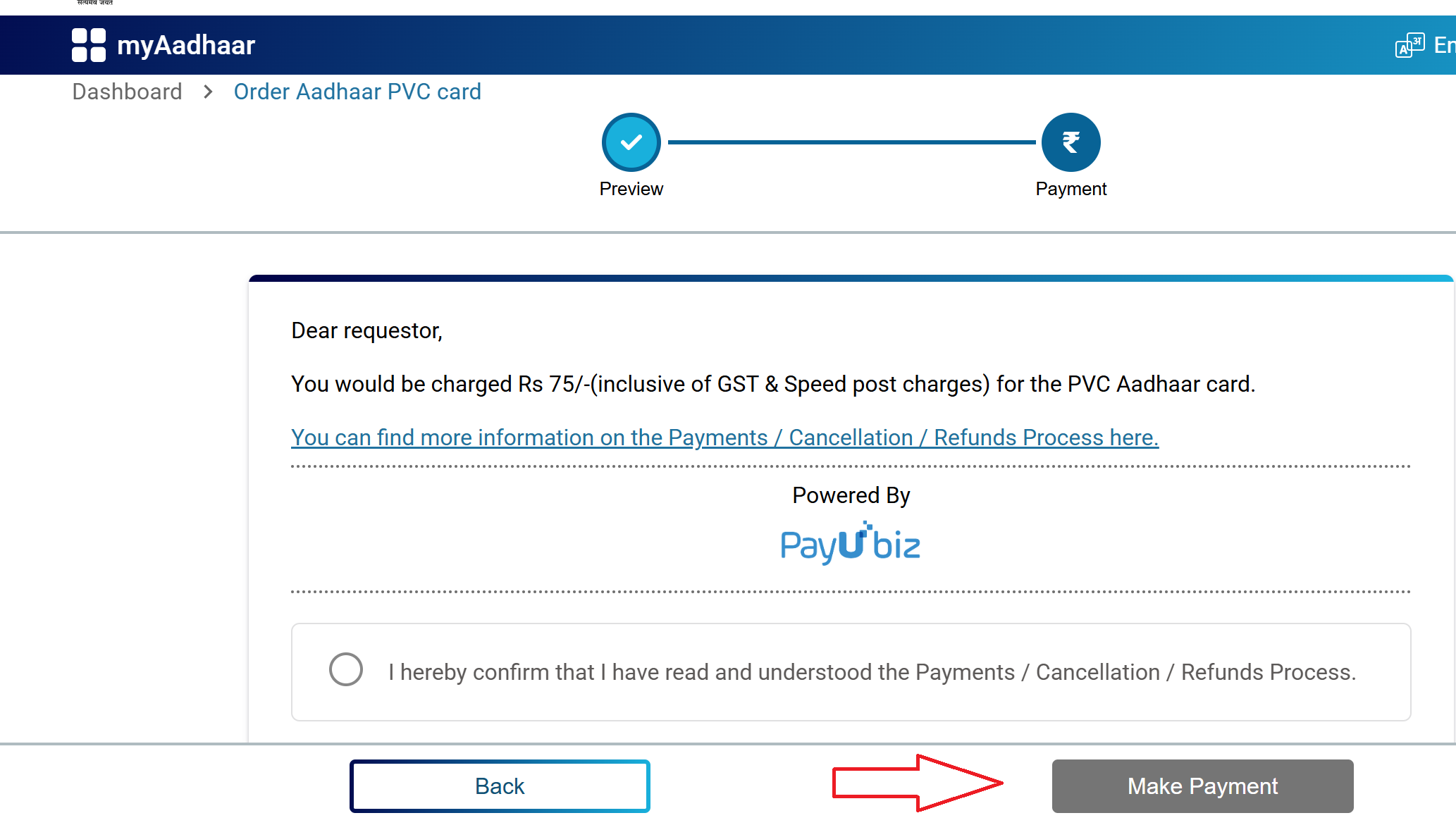
Complete the payment and wait for the confirmation screen.
Step 5: Save Your SRN
After successful payment, UIDAI generates a Service Request Number (SRN). This is your tracking number. Save it, screenshot it, or write it down. You'll need the SRN to check your order status and track delivery.
You may also get an option to download a payment receipt or acknowledgement slip. It's a good idea to keep that until the card is delivered.
Order Aadhaar PVC Card using mAadhaar App
If you prefer using your phone, you can also order the PVC card through the mAadhaar app.
- Open the mAadhaar app (available on Android and iOS)
- Log in or register with your Aadhaar-linked mobile number
- Navigate to "Order Aadhaar PVC Card" in the app menu
- Review your details, complete the payment, and save the SRN
How Much Does It Cost?
| Item | Cost |
|---|---|
| PVC Aadhaar card (including GST + Speed Post delivery) | ₹75 |
That's a flat, all-inclusive price. There are no hidden charges. The ₹75 covers the card printing, GST, and delivery via India Post's Speed Post service.
How to Check Your PVC Aadhaar Card Status
Once you've placed the order, here's how to track it:
On the myAadhaar Portal:
- Go to myaadhaar.uidai.gov.in
- Click on "Check Aadhaar PVC Card Order Status"
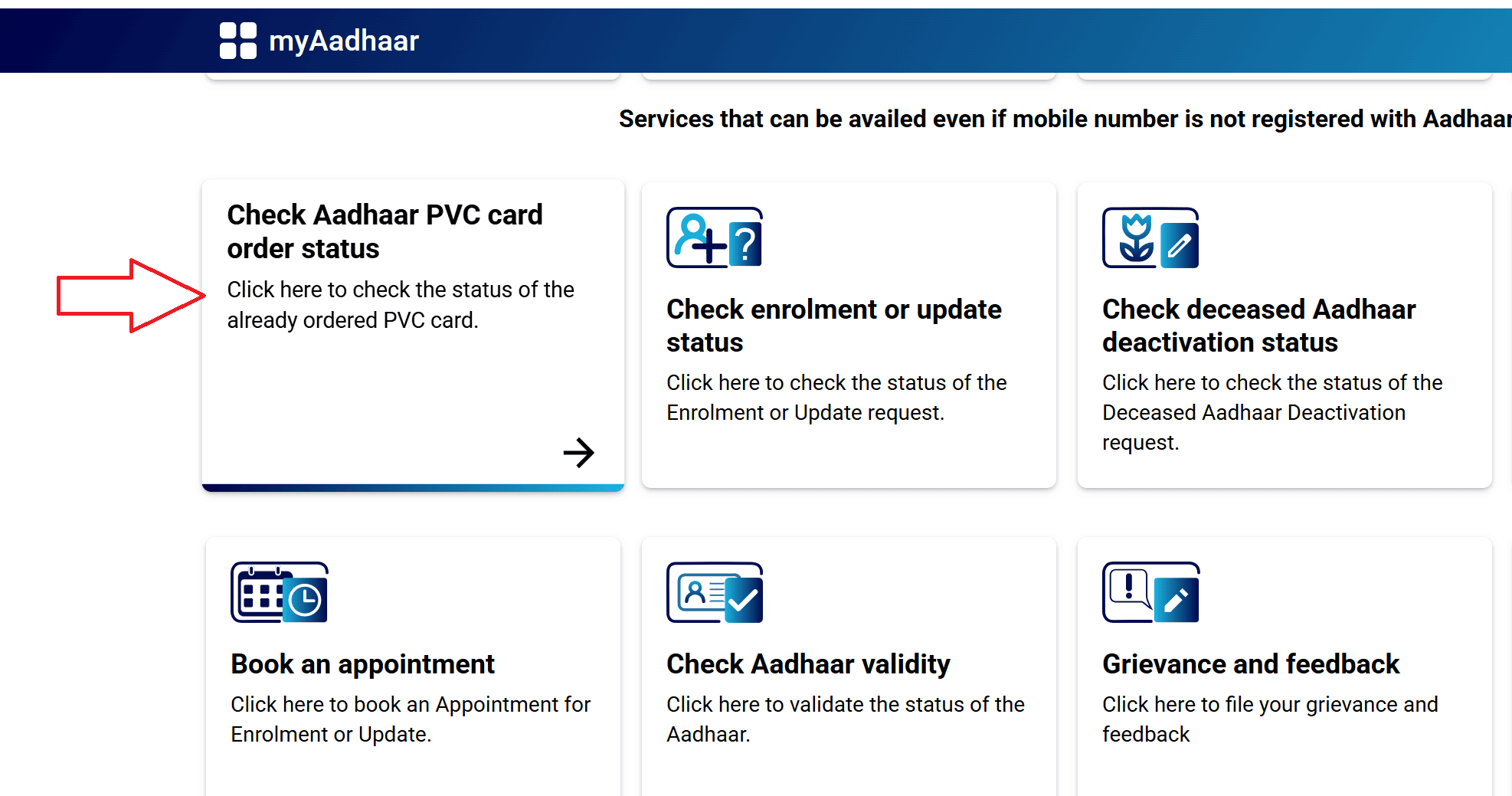
- Enter your SRN (Service Request Number)
- Fill in the captcha and click Submit
On the mAadhaar App:
- Open the app and go to "Check Aadhaar Status"
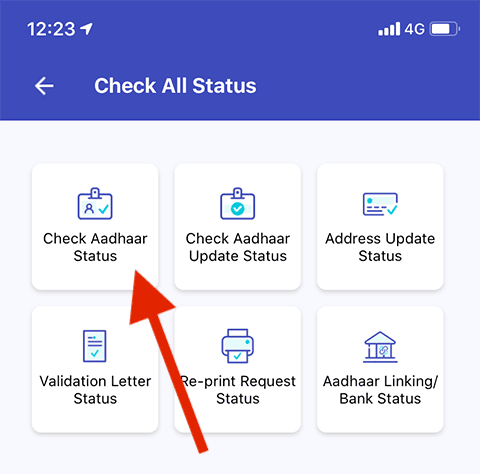
- Select "PVC card request status"
- Enter your SRN and submit
By Calling 1947:
Dial 1947 from your registered mobile number, follow the IVR prompts, and press 3 for PVC card status. Enter your SRN when asked.
Via SMS:
You can also check PVC card status by SMS. Send your SRN in the format specified for your state to 567678 or 56161. You'll receive a reply with the current status.
What Each Status Message Means
As your order moves through different stages, the portal will show different status messages. Here's what each one means:
- Payment Received / Order Accepted means UIDAI has received your payment and your order is in the system. Nothing to do here except wait.
- Under Process / Processing means your PVC card request is being prepared for printing. UIDAI is verifying the details and queuing it for production.
- Printed means your card has been physically printed and is being prepared for dispatch. This usually happens within 5 working days of placing the order.
- Dispatched / Handed Over to DoP means your card has been handed over to the Department of Post (India Post) for delivery via Speed Post. At this point, you should receive an SMS with a consignment/tracking number.
- Out for Delivery means the card is with your local postal delivery agent and should reach you soon.
- Delivered means the card has been delivered to the address registered in your Aadhaar.
- SRN Not Found / Invalid SRN usually means one of three things: you entered the SRN wrong, the payment didn't go through successfully, or the system hasn't updated yet. Double-check the SRN and try again after some time.
Tracking Delivery Through India Post
Once your status shows "Dispatched" and you have the consignment number (sent via SMS), you can track the physical delivery:
- Go to the India Post tracking page at indiapost.gov.in
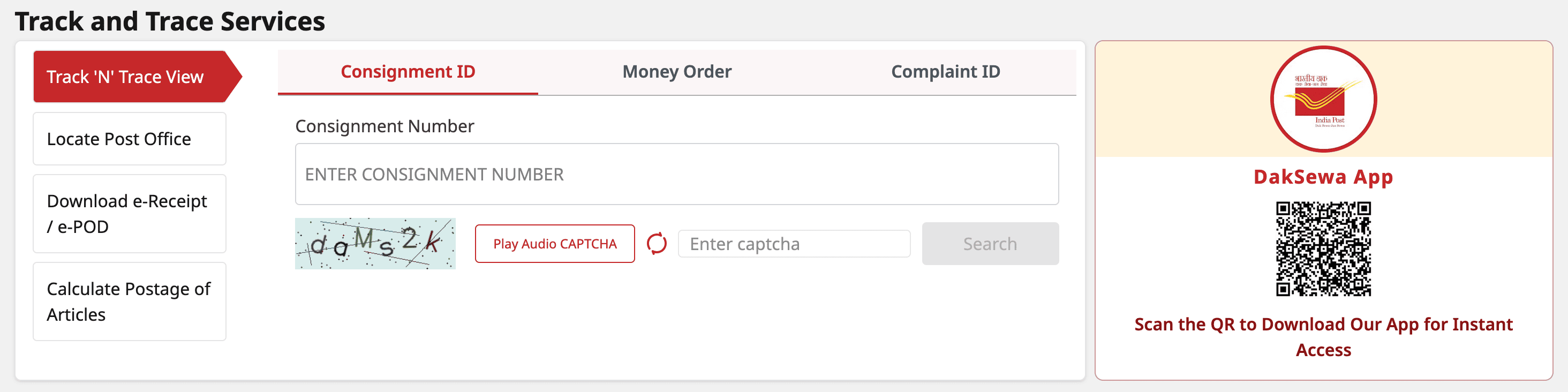
- Enter the consignment number
- Click Search to see delivery updates
Delivery Timeline
Here's a rough breakdown of how long the whole process takes:
| Stage | Timeline |
|---|---|
| UIDAI processes and prints the card | About 5 working days |
| Handover to India Post (Department of Post) | 1 to 2 days after printing |
| Speed Post delivery to your address | 5 to 15 working days |
| Total estimated time | 10 to 20 working days |
Important Notes
1. Only order from official UIDAI sources.
The legitimate ways to order are through myaadhaar.uidai.gov.in or the mAadhaar app. If any third-party website claims to offer PVC Aadhaar cards, avoid it. You'll end up paying more and possibly compromising your personal data.
2. Double-check your photo before ordering.
The PVC card will use whatever photo is currently in UIDAI's system. If your photo is very old or unclear, consider getting a biometric update (which includes a fresh photo) at an Aadhaar centre before ordering the PVC card.
3. You can order for family members.
There's no restriction that says you can only order for yourself. If you have the Aadhaar numbers and can complete OTP verification (or use the non-registered mobile option), you can order PVC cards for your parents, spouse, or children.
4. Keep the SRN safe until delivery.
The SRN is the only way to track your order. If you lose it and the card doesn't arrive, resolving the issue becomes much harder.
5. If the card doesn't arrive within 30 days, escalate.
After 20 working days, if there's no delivery and the status is stuck, contact UIDAI's helpline at 1947 or visit your nearest Aadhaar Seva Kendra. You can also file a grievance on the UIDAI website or email help@uidai.gov.in.
6. The PVC card doesn't replace biometric authentication.
Having a PVC card doesn't mean you can skip biometric verification where it's required. The card is for visual identity verification. Biometric services (like Aadhaar-based payments or authentication) still use your fingerprints and iris data stored with UIDAI.
7. Aadhaar is not proof of citizenship.
This applies to all formats, including PVC. Aadhaar verifies your identity and address as a resident of India. It does not establish citizenship. This is something UIDAI and the Supreme Court have both clarified.
Aadhaar Guides — Related Articles
Detailed guides covering Aadhaar card download, update, enrolment, PAN linking, and more.
Step 1: Open the MyAadhaar Portal · Step 2: Click on "Virtual ID (VID) Generator" · Step 3: Select "Generate VID" or "Retrieve VID" · Step 4: Enter Your Aadhaar Number and Captcha · Step 5: Request and Enter OTP · Step 6: Receive Your 16-Digit VID via SMS.
Aadhaar Complaint & GrievanceIf you're dealing with an Aadhaar problem, whether it's a wrong name, failed fingerprint, this guide walks you through exactly how to file a complaint and what to expect.
Aadhaar Card Download GuideLearn how to download your Aadhaar card online using the UIDAI portal, mAadhaar app, DigiLocker, and other official methods. Step by step, simple and quick.
Aadhaar Card Status GuideCheck your Aadhaar card status online for enrolment, update, and PVC card requests using myAadhaar portal, mAadhaar app, and UMANG app. You can also track your Aadhaar status by calling the UIDAI helpline at 1947.
Aadhaar Card Update GuideLearn how to update your Aadhaar card online and offline using the UIDAI portal, mAadhaar app, and nearest Aadhaar centre. Update your name, address, date of birth, mobile number, email, and photo easily.
My Aadhaar UIDAI Login GuideStep 1: Open the MyAadhaar Portal · Step 2: Enter Your Aadhaar Number · Step 3: Enter the Captcha · Step 4: Request OTP · Step 5: Enter OTP and Login.
Aadhaar Enrolment GuideLearn how to enrol for a new Aadhaar card in 2026. This guide covers required documents, appointment booking, and the step-by-step enrolment process for adults, children, NRIs, and foreign nationals.
Order Aadhaar PVC Card GuideLearn how to order your Aadhaar PVC card online through the myAadhaar portal and mAadhaar app. Check your PVC card order status, track delivery, fees, required documents, etc.
Retrieve Aadhaar Number GuideLearn how to retrieve your lost or forgotten Aadhaar number online and offline using the myAadhaar portal, mAadhaar app, the new Aadhaar app, the UIDAI helpline 1947, or by visiting an Aadhaar Enrolment Centre.
Aadhaar PAN Link GuideLearn how to link your PAN with Aadhaar online, via SMS, and offline using the Income Tax portal. Step-by-step guide covering link status check, late fee payment, name mismatch fix, PAN reactivation, and exemptions.
mAadhaar AppLearn everything about the mAadhaar app. Download, setup, all features explained (VID, TOTP, biometric lock, eKYC, and more), and how it differs from the new Aadhaar app launched in 2026.
New Aadhaar App 2026Learn everything about the new Aadhaar app launched by UIDAI in 2026. Selective sharing, face authentication, offline verification, and mobile number update. Complete setup guide.
Protect Your AadhaarLearn how to protect your Aadhaar from misuse using biometric lock, Virtual ID, masked Aadhaar, Aadhaar Authentication History, and more. Step by step, simple and practical.
Aadhaar Authentication FailedLearn how to fix Aadhaar authentication failures caused by locked biometrics, worn fingerprints, server issues, and data mismatches. Step by step, simple and practical.
Aadhaar Enabled Payment SystemLearn how AePS (Aadhaar Enabled Payment System) lets you withdraw cash, check your balance, and receive government benefits using just your Aadhaar number and fingerprint.